Match the extension filter setting to the visible website

Redaily
6/12/2025

Updated
The page opened by the same extension can differ by account, region or time. Inspect the search page the task actually uses rather than inferring its version from account age or another user's update. The two screenshots below provide a historical comparison.
Step 1: complete an actual search
Open the selected regional site in the same signed-in browser and search for a keyword. Wait for results and controls before inspecting filters. A recommendation homepage, login screen or verification screen does not identify the search-filter version.
Step 2: compare historical visual cues
The earlier layout in the original tutorial showed 综合, meaning General, with fewer filtering options:

The other illustrated layout showed 筛选, meaning Filters, opening additional dimensions:
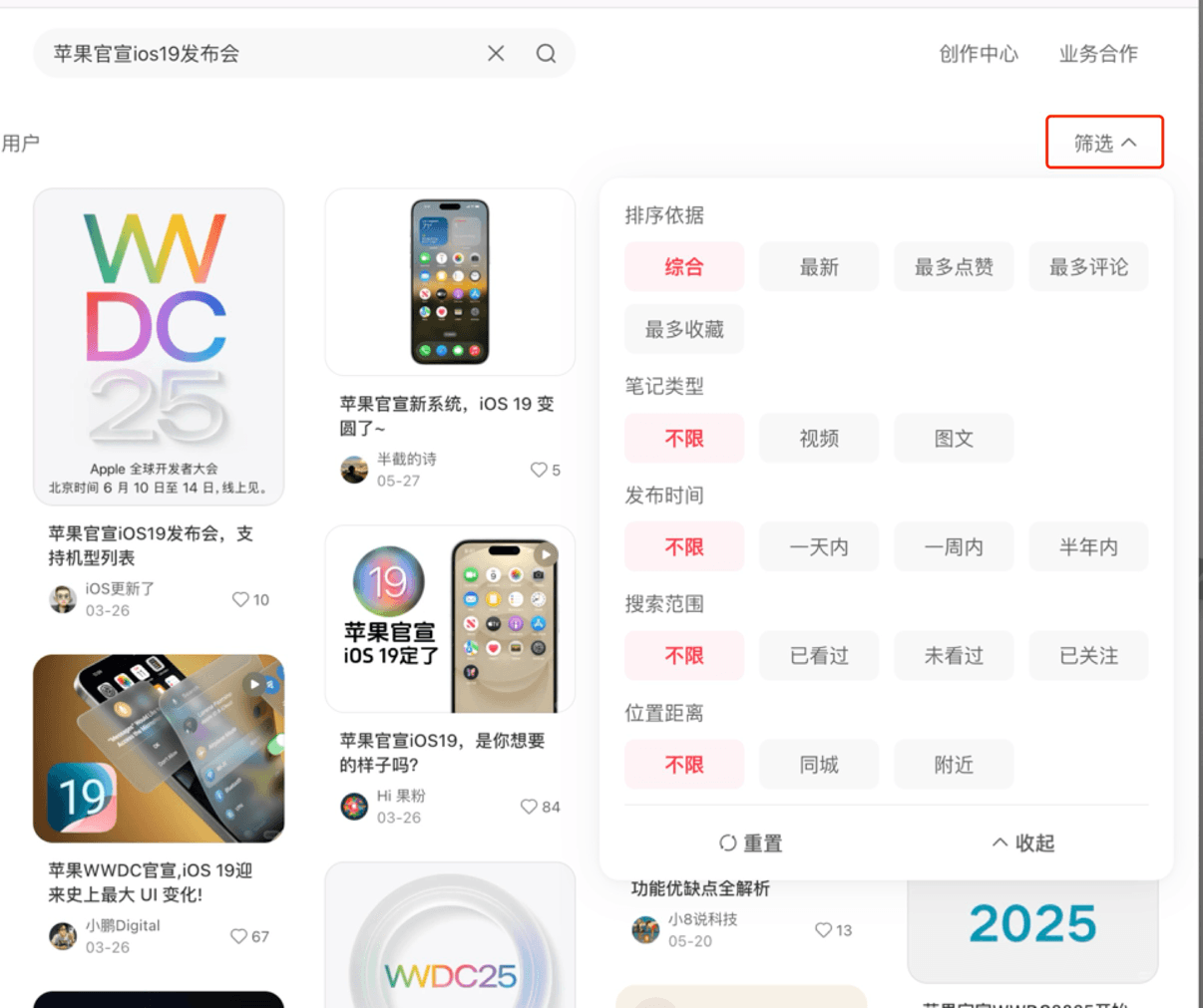
These are historical screenshots, not proof that every current page can be classified by those two labels alone. If the interface changes again, compare actual fields and behavior instead of forcing it into a screenshot category.
Step 3: compare controls you can operate
Look for sorting, post type, publication period, search scope and location. Older configuration mainly covers general/latest/hottest and post type; newer configuration offers additional sorting and scope fields. The extension should match visible controls, not assume missing options exist.
- Change one filter manually and confirm the website responds.
- Select the corresponding version and condition in a simple workflow.
- Observe whether execution selects the intended control and inspect results.
- For no results, relax restrictions before concluding the version is wrong.
If neither screenshot matches
Retain region, browser/extension versions, keyword and a redacted screenshot. First check manual website operation. If it works but the extension cannot select a control, identify that step and report it. Repeated clicking or parallel plans cannot force the website into another version.
The reason for a particular interface rollout requires platform evidence. Layout differences alone cannot confirm rollout status or when a particular account will receive another interface. Layout differences are not account-ranking or paid-access differences.
Product reference
Product steps were checked against extension 3.5.3. See the related guide for instructions and pricing for access. Report behavior that differs through feedback, including the version and a redacted error.